Just over a decade ago, Canva ushered in a new generation of design by transforming a complex, expensive desktop software into an all-in-one platform that is simple, powerful, and accessible from the browser. It replaced the fear of a blank page with millions of templates and swapped pixel-by-pixel manual editing for a more intuitive drag-and-drop creation experience. In doing so, it became one of the world’s most-used platforms, with more than 250 million people using it each month. This announcement, unveiled at the company’s flagship Canva Create event in Los Angeles, marks the start of the next phase for design creation.
Driven by the brand’s AI lab and years of investment in foundational models for design, Canva AI 2.0 transforms the platform into a conversational, agent-focused environment where teams can move from idea to execution in one place. The result is a powerful creative ally throughout the entire process, from the initial idea to the final result.
A new and powerful architectural layer
Canva AI 2.0 introduces a new architectural layer that reinvents the entire design process and makes materializing an idea easier than ever. It represents the biggest change the company has made since moving design from desktop software to the browser.
Here are the updates:
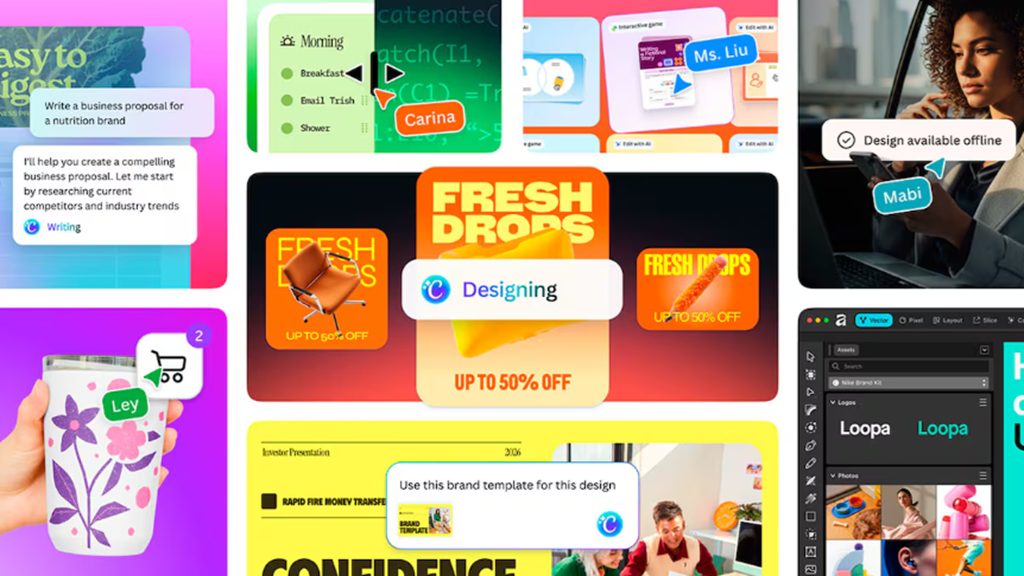
- Conversational design enables creation from natural language or voice prompts. No longer necessary to start from a blank page or hunt for the perfect template. Simply describe an idea, a goal, or a basic structure, and Canva AI generates a fully editable design with structure, brand identity, and layout from the start. Unlike other AI tools that generate a single result, Canva AI 2.0 accompanies people through the entire creative process, maintaining context as ideas evolve and helping to ideate, refine, and improve at each stage.
- Smart orchestration introduces AI that works directly with the user. Start from a goal, sketch, or briefing and Canva AI will execute and materialize it through a single conversation. Behind this experience, a new orchestration layer brings together Canva’s entire toolkit to transform ideas into final results. It understands what you want to achieve, selects the right tools, and coordinates them to generate everything needed in multiple formats. For example, asking it to create “a multichannel campaign plan to launch new summer products” automatically generates all materials ready to tailor or publish.
Object-based intelligence enables precise changes without starting from scratch. If you request a change to Canva AI, it will modify only that element. It can swap images, adjust headlines, or modify typography without compromising the rest of the design. Thanks to the design foundation model, everything created stays organized by layers and is fully editable, as if it were created from scratch in the editor. This makes it easier for teams to collaborate, add comments, and continually improve the work.
Active memory learns and improves with every use. Thanks to persistent memory, Canva AI understands how its users work, maintains brand coherence across projects, and automatically applies the desired style. It learns from activity and adapts to the preferences and goals of each team, boosting its usefulness over time. It can also be customized from existing designs to create a personal memory library and an “About Me” profile that continually tunes the experience.
New intelligent workflows
Canva AI 2.0 goes beyond design generation to become the central system where work is developed. From quick, on-demand design to a full campaign, it integrates tools, processes, and results in a single environment, boosting daily productivity and turning Canva into an essential day-to-day tool for teams.
- Connectors: all work in one place. Canva AI centralizes all the information needed to create rather than scattering it across multiple applications. It lets you connect tools like Slack, Gmail, Google Drive, or Calendar and use conversations, content, and schedules to generate exactly what’s needed. It can generate meeting summaries from Zoom transcripts, turn customer emails into personalized business proposals, or create corporate newsletters based on Slack activity. Among the first connectors are Slack, Notion, Zoom, HubSpot, Gmail, Google Drive, and Google Calendar, with more on the way.
- Scheduled tasks: autopilot work. Just schedule tasks once and Canva AI will automate them and run in the background, even offline. For example, generate every Friday a complete package of social media content tailored to each channel and translate it into the ten most-spoken languages in the United States, or have Canva AI analyze your inbox every morning and prepare briefing documents for meetings based on the agenda. The work runs automatically, reducing hours of effort to seconds.
- Web research: integrated information. Web research integrates the information gathered directly into the workflow. It allows on-demand searches or scheduled ones, while Canva AI collects and organizes information from the web. From business proposals to market analysis, everything is incorporated into the design as structured, editable content, ready for review and sharing.
- Brand intelligence: coherence from the start. Brand intelligence ensures that every design respects the brand identity from the first moment. Just connect the data or describe what you need and Canva AI automatically applies these typography, colors, and style across all designs. It also lets you update existing work to fit a new brand identity in seconds, eliminating manual processes.
- Canva Code 2.0 with HTML import. Lets you describe any idea for Canva AI to generate a complete, structured, interactive experience that adapts to all devices. With HTML import, Canva embraces one of the fastest-growing AI formats. Rather than regenerating code with every change, you can import HTML files or AI-generated experiences and edit them directly in Canva’s visual editor, without rebuilding. From there, everything is managed in one environment: add forms connected to Canva spreadsheets, integrate interactive elements into presentations, or publish to your own domains with SSO protection.
- Canva AI Sheets: smarter spreadsheets, no hassle. Describe what you need and Canva AI 2.0 will generate a fully structured sheet, with real, verified data and a polished design. From budget tracking to project timelines, editorial calendars, or research data tables, your sheet will be generated with all relevant data, neatly organized and well designed.
- Template Remix: an infinite library of inspiration. Canva’s template library has always been expansive, but it’s now truly infinite. With Canva AI 2.0, the platform introduces an inexhaustible source of inspiration that users can explore, reinterpret, and tailor to their needs. Just start from any design that catches your eye and, through Canva AI, transform it into the desired result. Each template becomes a starting point, not a limit.